Showing posts with label clawmotia. Show all posts

Sunday, February 26, 2012

The Nokia N9: Going for a spin

In short, I now have a Nokia n9, and setup a scratchbox for it, and compiled & installed abiword, clawmotia, unison, and libferris for and on the device. If that didn't enlarge your page down key, the longer version now follows ;-)

FWIW my impression of the device is very positive. Hardware wise the biggest issue I have is the inability to add more storage to it. A high gb microsd slotted in would make things a whole bunch nicer, mainly for using the device as a music box on the road. The speed of interaction is very nice, and the swipe interface is very easy to get used to. Just flick an app away to minimize it or flick from another screen edge to close it.

gstreamer works quite nicely for viewing network streams, though there is a deadzone bar on the logical "bottom" of the screen (left of screen in portrait mode). I noticed this bar in abiword too, so I assume it is an issue with going fullscreen for non Qt native apps.

There isn't much to show for unison, as I tend to drive that from the dekstop/laptop end of the connection. Getting it on the device is always a matter for first compiling ocaml and installing that into the scratchbox.

One very pleasant surprise is how snappy clawmotia runs on the n9. Startup time is significantly less than on the n900 and the screen operations like swiping the main controls left to get to the jog shuttle page is now at an acceptably smooth speed. I'll have to work up a video of this in action to show the speed of things...


I got libferris compiled for the n9 too. Using boost::spirit for some of the parsers has dropped one compile time dependency away. I did make both ferris and ferriscreate able to compile in glib2 only mode. You loose one or two apps by doing this, but it also makes the footprint smaller so that I can use it with QML apps without needing to pull in gtk2 from a third party repo just for those apps in ferris itself. Mainly some capplets, gfcreate, and the gfcp and other graphical coreutils reimplementations are lost in building this way.

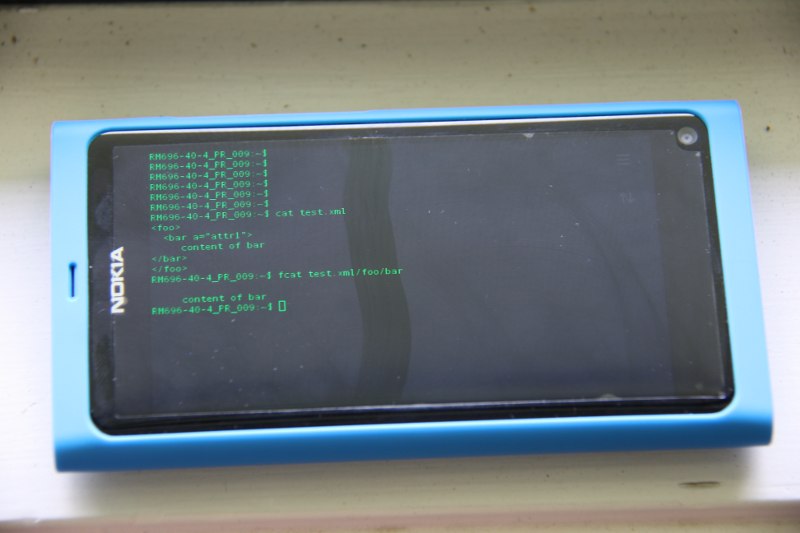
And what is not complete without a screenshot of things on the device? Sorry for the quality of the picture, I need to work out lighting for some device shots a bit better than this adhoc quick shot. Just to tap into the ferris power a tiny bit I decided to mount an XML file as a filesystem and fcat directly into it.. A few of the fun things I plan are a QML client for index/search using the customized maemo index backend in libferris and using the mounted pulseaudio and mounted gstreamer to implement yet another audio player for the device. The index+search in both these apps should be blisteringly fast, given that I could index an NFS mount with 10x the data I could hold on an n810 and search as you type in real time...


Abiword proved to be the harder thing to compile for the n9. It seems GTK2/3 has fallen off the device so I got gtk2 from a third party repository. The downside is that the app doesn't run entirely fullscreen and has pretty much no finger friendlyness from gtk2 itself. Oh yeah, the virtual keyboard doesn't come up on text entries in gtk2 either. I might be compiling and installing gtk2 incorrectly on the device, so this complaint about device interaction might be my own fault?

I then got libwv and libwmf, following the dependency rabbit down the white hole. Of course my abiword compile has full ODF support in it too! The below screenshot is of one of my sample ODF+RDF documents with the content that links to RDF shown in purple. For more info on RDF in abiword see the abiword talk video from lca 2012.


More fun an games to follow, and I'll post a link to a repo with the debs once I work out where I'm going to host the 100mb odd of files. Not all those are for the device, some are mainly for scratchbox such as the dev packages and full ocaml compiler debs.

Monday, November 8, 2010

Clawmotia and QML: Moving the TV

Some may know that Clawmotia is my MythTV remote control which started back in the n810 days. For a bit of fun while recovering from jet lag I decided to port Clawmotia over to using QML and take advantage of some of the n900's capabilities such as the accelerometer. Shown below is controlling the playback speed by moving the device. Apologies for the flicking video, it seems mythtv doesn't like the mov file in software playback much, but the Bunny is free to use so he made the audition.

Controlling MythTV with an n900 accelerometer from Ben Martin on Vimeo.


The normal functions from the older qedje remote are also available on the main page shown in the video below. I have now put the cursor keys into a submenu which is opened by both the joystick and menu buttons, the latter first getting mythtv to open the menu and then changing the remote configuration to show the cursor key submenu. This explains the vacant positions in the grid in the new design -- submenu shuffle has given me a few extra spots to play with. Also the settings can be set in the program itself now instead of the old edit the launcher file and set environment variables. I would like to make the volume adjustment use a popup slider and also route the hardware vol +/- keys to mythtv, but I'm still working out how to do the later.

Clawmotia QML: The Qt MythTV remote control from Ben Martin on Vimeo.


Interestingly, the big "oh no" moments came when I tried to do trivial things from QML such as reading a file (the accelerometer in /sys). I would have thought that QFile was available but it seems not. Perhaps it is from dedicated javascript files or I'm just doing it wrong^TM. I also notice that the simulator doesn't update that /sys file so you have to test that on the device :/

I also bumped into other things like hooking up signals bidirectionally which would need pass by reference or similar to make it useful in custom QML elements. I might also make some data bound classes to use with QSettings, it seems like an idea for a QString like class to update the QSettings automatically when you assign new data to it.

I also tinkered in Nokias SDK environment for this but reverted to emacs and js-mode because there are just too many things my hands are used to happening that don't in the SDK editor. Though for QML stuff I suspect I need to update my elisp to have better "add property" support so the get/set/signal/member declarations are all added from a "QString foo" input. I have part of that done but need to revisit it.

Saturday, September 25, 2010

n900: The claw arrives!

Clawmotia is a MythTV remote control written using Qt and EFL technology. My repository contains a tarball ready to install clawmotia onto an n900. Desktop shortcut optional :)


Simply extract the tarball into /opt on the device. From there, you currently have to install the desktop file yourself to get it onto the menus. Finally, you'll need to edit start-clawmotia.sh to tell the application where your mythtv server is at and which client you want to control through that server. I plan to add dynamic client selection and a user configuration window in the app itself, but I seem to have more plans than the clock allows.

Saturday, October 31, 2009

I give you the CLAW!

Clawmotia, an edje MythTV remote control.
Sources hot off the presses: clawmotia-0.0.1. You'll also notice the diablo binary for clawmotia on there so you don't need a scratchbox to get going. I put the clawmotia.edj up too so you don't even need to compile that if you don't wanna.

Dependencies on the device: Qt, qedje. You probably have most of the requirements for the latter installed if you have canola2 on the device. There are deb files for qedje on its web site. Qt is also packaged for the n810. I don't have debs for clawmotia yet, feel free to send the debian directory to do that.

You'll obviously need a MythTV server (and client) to use the remote. It uses the web interface to mythtv so you'll want that installed on the server machine too. The various configuration settings are passed in using environment variables in version 0.0.1. See the script start-clawmotia.sh for these settings. You will also need to be in the same directly as the .edj file when you start clawmotia as it expects that at this point. I install the script, binary and edj into /usr/local/bin on the device.

Setting CLAWMOTIA_FS=1 will start clawmotia full screen. There is a bug in version 0.0.1 where it will start but not be shown if started full screen. You have to switch to another app and back to clawmotia to see it. I was planning to fix this before release, but it seems some folks want to have a tinker with it so I'll fix that bug soon.

If you want to change the buttons or layout, you only need to edit the clawmotia.edc file. If you are good with the gimp, you might like to reate a theme at 800x480. As long as you use layers it should be a fairly mechanical process to create an edc file for your theme.

To make a button, define its image in the images section and call the three macros COMMAND_BUTTON, COMMAND_BUTTON_ICON, and COMMAND_PROGRAMS. COMMAND_BUTTON sets up the area of the screen that will react to your button with an optional text label for the button as arg2. COMMAND_BUTTON_ICON links a COMMAND_BUTTON with an image file. And COMMAND_PROGRAMS links a button with the exact, HTTP encoded string to send to the MythTV server. HTTP encoding doesn't effect single keys much, but Ctrl+w becomes Ctrl%2Bw. The first argument to all the three macros is the button name and should be the same for the same button. Taking a look at what is there and remembering to use all three macros to give (a) initial setup, (b) image file, (c) action should get you one the way.

You can update the theme by compiling it with edje_cc and copying it to the device. The application itself shouldn't need any changes.

Note that the bevel buttons are separate to the actual button function image. So if you like you can remote the button by setting 255 to 0 in the lines
color, 0 0 0 255
in the COMMAND_BUTTON definition in clawmotia.edc

I'll probably move to cmake or autofools at some point. If, on the odd case that there are many patches flowing in, then I'll throw the code into subversion somewhere.

The Rasterman has recommended cloning a few hardware remotes as themes. I'm not sure when I'll have the time for that but it should be interesting.

Oh yeah, and if you like this then you feel free to contribute toward a memory card or IR transmitter for my future tinkering. Or send any old n900's you have laying around ;) Hey... I can dream right?

Thursday, October 29, 2009

I want my MythTV: Clawmotia

I noticed that there are many packages which turn a maemo device into a remote control. Unfortunately, the MythTV ones I saw either didn't install or were not what I was looking for. Thus clawmotia was born yesterday.


I'm using edje for the interface and qedje to actually create the UI. The program logic uses Qt to talk to a MythTV server and send the commands to it. This relies on knowing there your server is, and what client you want to control which are both passed in as environment variables. Really simple stuff, but it works well.

You'll need the Web interface on the MythTV server machine too. The upshot is that you only need a wifi connection and you can control any MythTV client you want. No bluetooth or IR dongles needed.

As you can see, there are some nasty graphical artifacts on the buttons which I'm not sure if its the evas engine or something to do with qedje. The black parts on the buttons are not there on the desktop.

As it uses edje, you can create different themes and layouts, compile the edje on your desktop machine and just scp it to the device to change the layout and button functionality. Including cute little slide in and out panels for the more rarely used controls. Hopefully I can convince somebody with more artistic ability than me to do just that. Source will be released in the next few days.