Over the last few years I've been fortunate enough to hack on Calligra and Abiword, adding support for the RDF/XML that can be stored as part of an ODF document. Both suites can also interact with each other, allowing RDF to move over the clipboard along with the text content.
There are some things abiword can do with RDF that Calligra currently can't. These include highlighting the parts of the document that have RDF associated and initial support for capturing relations between things in RDF. Such relationships from RDF can give back to the user right off the bat. For example they can be useful for navigating the document by semantics, moving from a child to their parent, or the cat to it's owner. RDF also opens up document computing to other possibilities like navigating by time rather than by the linear sequence of pages.
I am currently looking to do some more development around ODF. It would be wonderful to do some more indepth hacking on either project as they both have a very nice, welcoming, open source team behind them. If anybody knows of some sponsored hacking floating around for these tools, please get in touch :)
I recently committed a small change to Calligra to move back to using intrusive reference counting for some non graphical RDF objects. While Calligra can use marble to allow editing locations from RDF, I used marble at a level in the calligra stack that isn't optimal, so have to shift that to a plugin to allow it to be easily accessible to distribution builds.
C++, Linux, libferris and embedded development. Yet another blog from yet another NARG.
Showing posts with label abiword. Show all posts
Monday, July 23, 2012
Sunday, February 26, 2012
The Nokia N9: Going for a spin
In short, I now have a Nokia n9, and setup a scratchbox for it, and compiled & installed abiword, clawmotia, unison, and libferris for and on the device. If that didn't enlarge your page down key, the longer version now follows ;-)
FWIW my impression of the device is very positive. Hardware wise the biggest issue I have is the inability to add more storage to it. A high gb microsd slotted in would make things a whole bunch nicer, mainly for using the device as a music box on the road. The speed of interaction is very nice, and the swipe interface is very easy to get used to. Just flick an app away to minimize it or flick from another screen edge to close it.
gstreamer works quite nicely for viewing network streams, though there is a deadzone bar on the logical "bottom" of the screen (left of screen in portrait mode). I noticed this bar in abiword too, so I assume it is an issue with going fullscreen for non Qt native apps.
There isn't much to show for unison, as I tend to drive that from the dekstop/laptop end of the connection. Getting it on the device is always a matter for first compiling ocaml and installing that into the scratchbox.
One very pleasant surprise is how snappy clawmotia runs on the n9. Startup time is significantly less than on the n900 and the screen operations like swiping the main controls left to get to the jog shuttle page is now at an acceptably smooth speed. I'll have to work up a video of this in action to show the speed of things...

I got libferris compiled for the n9 too. Using boost::spirit for some of the parsers has dropped one compile time dependency away. I did make both ferris and ferriscreate able to compile in glib2 only mode. You loose one or two apps by doing this, but it also makes the footprint smaller so that I can use it with QML apps without needing to pull in gtk2 from a third party repo just for those apps in ferris itself. Mainly some capplets, gfcreate, and the gfcp and other graphical coreutils reimplementations are lost in building this way.
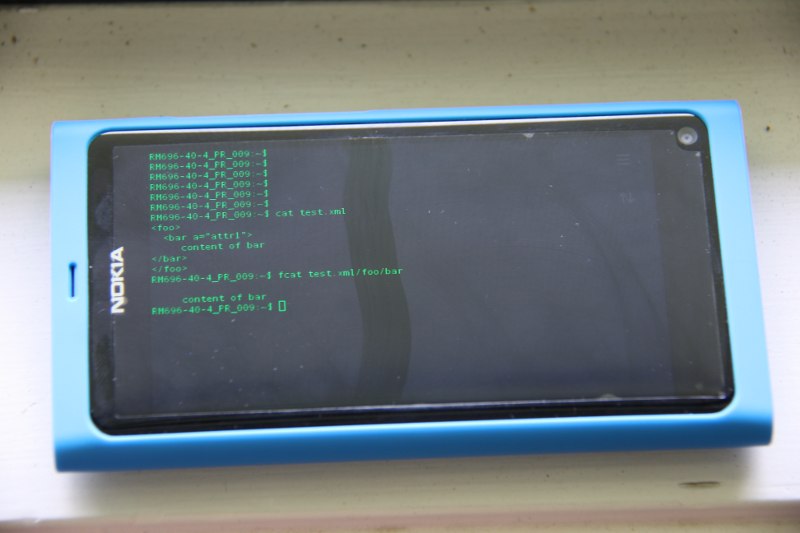
And what is not complete without a screenshot of things on the device? Sorry for the quality of the picture, I need to work out lighting for some device shots a bit better than this adhoc quick shot. Just to tap into the ferris power a tiny bit I decided to mount an XML file as a filesystem and fcat directly into it.. A few of the fun things I plan are a QML client for index/search using the customized maemo index backend in libferris and using the mounted pulseaudio and mounted gstreamer to implement yet another audio player for the device. The index+search in both these apps should be blisteringly fast, given that I could index an NFS mount with 10x the data I could hold on an n810 and search as you type in real time...

Abiword proved to be the harder thing to compile for the n9. It seems GTK2/3 has fallen off the device so I got gtk2 from a third party repository. The downside is that the app doesn't run entirely fullscreen and has pretty much no finger friendlyness from gtk2 itself. Oh yeah, the virtual keyboard doesn't come up on text entries in gtk2 either. I might be compiling and installing gtk2 incorrectly on the device, so this complaint about device interaction might be my own fault?
I then got libwv and libwmf, following the dependency rabbit down the white hole. Of course my abiword compile has full ODF support in it too! The below screenshot is of one of my sample ODF+RDF documents with the content that links to RDF shown in purple. For more info on RDF in abiword see the abiword talk video from lca 2012.

More fun an games to follow, and I'll post a link to a repo with the debs once I work out where I'm going to host the 100mb odd of files. Not all those are for the device, some are mainly for scratchbox such as the dev packages and full ocaml compiler debs.
FWIW my impression of the device is very positive. Hardware wise the biggest issue I have is the inability to add more storage to it. A high gb microsd slotted in would make things a whole bunch nicer, mainly for using the device as a music box on the road. The speed of interaction is very nice, and the swipe interface is very easy to get used to. Just flick an app away to minimize it or flick from another screen edge to close it.
gstreamer works quite nicely for viewing network streams, though there is a deadzone bar on the logical "bottom" of the screen (left of screen in portrait mode). I noticed this bar in abiword too, so I assume it is an issue with going fullscreen for non Qt native apps.
There isn't much to show for unison, as I tend to drive that from the dekstop/laptop end of the connection. Getting it on the device is always a matter for first compiling ocaml and installing that into the scratchbox.
One very pleasant surprise is how snappy clawmotia runs on the n9. Startup time is significantly less than on the n900 and the screen operations like swiping the main controls left to get to the jog shuttle page is now at an acceptably smooth speed. I'll have to work up a video of this in action to show the speed of things...
I got libferris compiled for the n9 too. Using boost::spirit for some of the parsers has dropped one compile time dependency away. I did make both ferris and ferriscreate able to compile in glib2 only mode. You loose one or two apps by doing this, but it also makes the footprint smaller so that I can use it with QML apps without needing to pull in gtk2 from a third party repo just for those apps in ferris itself. Mainly some capplets, gfcreate, and the gfcp and other graphical coreutils reimplementations are lost in building this way.
And what is not complete without a screenshot of things on the device? Sorry for the quality of the picture, I need to work out lighting for some device shots a bit better than this adhoc quick shot. Just to tap into the ferris power a tiny bit I decided to mount an XML file as a filesystem and fcat directly into it.. A few of the fun things I plan are a QML client for index/search using the customized maemo index backend in libferris and using the mounted pulseaudio and mounted gstreamer to implement yet another audio player for the device. The index+search in both these apps should be blisteringly fast, given that I could index an NFS mount with 10x the data I could hold on an n810 and search as you type in real time...
Abiword proved to be the harder thing to compile for the n9. It seems GTK2/3 has fallen off the device so I got gtk2 from a third party repository. The downside is that the app doesn't run entirely fullscreen and has pretty much no finger friendlyness from gtk2 itself. Oh yeah, the virtual keyboard doesn't come up on text entries in gtk2 either. I might be compiling and installing gtk2 incorrectly on the device, so this complaint about device interaction might be my own fault?
I then got libwv and libwmf, following the dependency rabbit down the white hole. Of course my abiword compile has full ODF support in it too! The below screenshot is of one of my sample ODF+RDF documents with the content that links to RDF shown in purple. For more info on RDF in abiword see the abiword talk video from lca 2012.
More fun an games to follow, and I'll post a link to a repo with the debs once I work out where I'm going to host the 100mb odd of files. Not all those are for the device, some are mainly for scratchbox such as the dev packages and full ocaml compiler debs.
Sunday, January 8, 2012
RDF, Abiword and Relations
Abiword now has growing GUI support for editing RDF in ODF documents. Much of this support compliments what is available in Calligra for RDF handling. There are some areas where Calligra has more features and some areas where Abiword now does. Hopefully both will continue to have a large and growing shared feature base.
As some folks will know, ODF allows one or more RDF/XML files to be shipped in the ODF file, and for that RDF to be linking to the document content from the content.xml file. This means that you can explicitly say that a 1/2 inch bolt is from a particular maker and was procured on the 3rd of January 2012 by going to their office at geolocation ?x. Handy when you are reading the document a year down the line and want to know which office you bought the bolt from and the exact length of its thread.
Looking at the below image, one can see the purple underlined pieces of text. Each of these has some RDF associated with it. The citation to Dan Brickley has both contact and location RDF associated with it. Looking at the toolbar, towards the right side you see an "R" to start a change tracked document, and the "RF" button. Sorry about the images there, I draw at the 3 year old level so my icons are not quite polished shall we say. Anyway, the "RF" button selects this reference to an RDF item. So if you are between the "am" in the purple "James" then the whole word will be selected with this button. The ">" and "<" buttons then allow you to move to the next and previous reference to the selected RDF item. As you notice another purple James later in the document, this is the second and only other reference to him and you can move between them using these buttons.

These purple links I call "RDF links", which is a bit of a play on hyperlinks or bookmarks. Behind the scenes they are implemented using xml:id values and pkg:idrefs to those from RDF.
A feature added in the last days is the ability to capture and navigate by the relation between two RDF links. This is currently done by selecting a "source" link and then clicking another rdf link and setting the relation to the source. So in the below screenshot I am saying that Mark foaf:knows James. You will also notice the "Find by Relation" option which I can then use to see the people that mark foaf:knows. In the spirit of the foaf definition, I have made this a symmetric relation. So there is no stalking, or "following", if James knows Mark then Mark knows James. Asymmetric relationships are also possible, like son, child, or contains. I am hoping to add this feature to Calligra too in the future as the relations between RDF objects is one of the more powerful features that can be offered by using RDF in a document.

Note that the prev/next RDF item buttons work with relations. If I pick mark and navigate to the James he knows then I can "next" from that james to select the second reference to James. This is one recurring theme to RDF in ODF, that RDF objects like contacts can be cited or linked zero or more times in the text content of the document.
As mentioned above, the converse is also true, and the Dan Brickley text has two logical RDF objects linked to it; Dan's contact information and his location. Handling this multi-object for a single site is a little tricky and in this editing will create a window with both the semantic objects in it to let you edit the RDF abiword knows about. Note that this dialog is actually backed by two (or more) SPARQL queries;

If you are not squeamish about your triples then the "Show RDF" option for an RDF link will let you get right at them and edit away as shown below. There are a few technically cool things about this dialog: firstly the "Restrict to RDF Link" combo box lets you select one or more RDF links that the triples will have to be associated with, and secondly abiword makes sure any edits you make are properly linked to the RDF link you right clicked on. What I mean by this last bit is if you right click the RDF link "alice33" add a new triple "uri:alive myvocab:likes uri:bob" then abiword will add the triple "uri:alice pkg:idref alice33" for you. This is sort of having abiword do what you mean in that you want the new triple to be associated with the link but don't necessarily want to have to explicitly say it all the time. By choosing to edit the RDF for the link you have already explicitly said once that you want these things to be linked. This also applies if you change a subject, uri:alice to uri:amanda will update the pkg:idref values for you. Keep it linked, keep it valid.

Going one level deeper, the above dialog is actually a subclass of a restricted RDF model created using SPARQL. The SPARQL model is read only, and the subclass, RDFModel_XMLIDLimited handles mutations by creating a wrapper object which takes care of the automatic triple relinking mentioned above. Those still awake might like to see the abiword trunk code for src/text/ptbl/xp/pd_DocumentRDF.cpp.
This is part of an ongoing mad hacking sprint that is leading up to a talk at LCA 2012 which starts in a week. Many of the things I mention here are not in trunk yet, and only tested on Linux/GTK+3. Those in Ballarat in a week might like to pop in to the talk given my Martin and myself on Friday the 20th.
As some folks will know, ODF allows one or more RDF/XML files to be shipped in the ODF file, and for that RDF to be linking to the document content from the content.xml file. This means that you can explicitly say that a 1/2 inch bolt is from a particular maker and was procured on the 3rd of January 2012 by going to their office at geolocation ?x. Handy when you are reading the document a year down the line and want to know which office you bought the bolt from and the exact length of its thread.
Looking at the below image, one can see the purple underlined pieces of text. Each of these has some RDF associated with it. The citation to Dan Brickley has both contact and location RDF associated with it. Looking at the toolbar, towards the right side you see an "R" to start a change tracked document, and the "RF" button. Sorry about the images there, I draw at the 3 year old level so my icons are not quite polished shall we say. Anyway, the "RF" button selects this reference to an RDF item. So if you are between the "am" in the purple "James" then the whole word will be selected with this button. The ">" and "<" buttons then allow you to move to the next and previous reference to the selected RDF item. As you notice another purple James later in the document, this is the second and only other reference to him and you can move between them using these buttons.

These purple links I call "RDF links", which is a bit of a play on hyperlinks or bookmarks. Behind the scenes they are implemented using xml:id values and pkg:idrefs to those from RDF.
A feature added in the last days is the ability to capture and navigate by the relation between two RDF links. This is currently done by selecting a "source" link and then clicking another rdf link and setting the relation to the source. So in the below screenshot I am saying that Mark foaf:knows James. You will also notice the "Find by Relation" option which I can then use to see the people that mark foaf:knows. In the spirit of the foaf definition, I have made this a symmetric relation. So there is no stalking, or "following", if James knows Mark then Mark knows James. Asymmetric relationships are also possible, like son, child, or contains. I am hoping to add this feature to Calligra too in the future as the relations between RDF objects is one of the more powerful features that can be offered by using RDF in a document.

Note that the prev/next RDF item buttons work with relations. If I pick mark and navigate to the James he knows then I can "next" from that james to select the second reference to James. This is one recurring theme to RDF in ODF, that RDF objects like contacts can be cited or linked zero or more times in the text content of the document.
As mentioned above, the converse is also true, and the Dan Brickley text has two logical RDF objects linked to it; Dan's contact information and his location. Handling this multi-object for a single site is a little tricky and in this editing will create a window with both the semantic objects in it to let you edit the RDF abiword knows about. Note that this dialog is actually backed by two (or more) SPARQL queries;

If you are not squeamish about your triples then the "Show RDF" option for an RDF link will let you get right at them and edit away as shown below. There are a few technically cool things about this dialog: firstly the "Restrict to RDF Link" combo box lets you select one or more RDF links that the triples will have to be associated with, and secondly abiword makes sure any edits you make are properly linked to the RDF link you right clicked on. What I mean by this last bit is if you right click the RDF link "alice33" add a new triple "uri:alive myvocab:likes uri:bob" then abiword will add the triple "uri:alice pkg:idref alice33" for you. This is sort of having abiword do what you mean in that you want the new triple to be associated with the link but don't necessarily want to have to explicitly say it all the time. By choosing to edit the RDF for the link you have already explicitly said once that you want these things to be linked. This also applies if you change a subject, uri:alice to uri:amanda will update the pkg:idref values for you. Keep it linked, keep it valid.

Going one level deeper, the above dialog is actually a subclass of a restricted RDF model created using SPARQL. The SPARQL model is read only, and the subclass, RDFModel_XMLIDLimited handles mutations by creating a wrapper object which takes care of the automatic triple relinking mentioned above. Those still awake might like to see the abiword trunk code for src/text/ptbl/xp/pd_DocumentRDF.cpp.
This is part of an ongoing mad hacking sprint that is leading up to a talk at LCA 2012 which starts in a week. Many of the things I mention here are not in trunk yet, and only tested on Linux/GTK+3. Those in Ballarat in a week might like to pop in to the talk given my Martin and myself on Friday the 20th.
Wednesday, October 12, 2011
Semantic Revolutions
I thought a fun little scenario for RDF in ODF would be to bounce information from Evolution, through abiword, to calligra, and then drag it back into evolution again. So information goes from ical to RDF, crosses the clipboard as RDF inside of an ODF file with linked text, and then is dragged back into ical format again. I notice a little timezone bug in there, but on the whole things work as one would expect.
Tuesday, September 20, 2011
Copy and Paste with Semantics...
Copy and Paste now preserves RDF between both Calligra and abiword in both directions. This lets you select some text in a document in either application, copy it, and paste it into the other application and have the RDF that is associated with that part of the document go along with the text you selected.
In the below screencast, the document that Calligra is editing has some contact and event information stored in RDF. The three people in the first sentence all have contact information associated. As you can see, the RDF sidepanel in Calligra lets you know about this as the cursor moves around. James has his phone number captured in RDF which the edit dialog shows. If I select one or more of these contacts and "Copy" them to the clipboard, Calligra creates an ODF file with embedded RDF in it and offers that on the clipboard.
Abiword is happy to accept that ODF content and when you paste it into a document you can see that the RDF links are preserved, and that there are 7 RDF triples associated with James. Of course, you want full disclosure of this information, so clicking show RDF lets you examine and edit those RDF triples.
I put a little trick in going the other way just to spice things up a little bit. The multi.odt file that I have open in abiword has two RDF links in scope at the Wing-B link. RDF is associated with the whole paragraph and explicitly with the link itself. In particular, the uri:widetime is associated with the paragraph while the uri:wingb is associated with the RDF link itself. Once I grab that RDF link and copy it to the clipboard, again an ODF file is offered (as well as text and rtf), and again Calligra is more than happy to accept an ODF file on the clipboard. Notice that when I show all the RDF in Calligra both the widetime and wingb RDF triples have now become part of the document.
I made some changes in both calligra and abiword to get this to happen. Changes to the former were quite small. You'll have to grab trunk from both applications if you want to play along at home. The code is committed in both trees.
In the below screencast, the document that Calligra is editing has some contact and event information stored in RDF. The three people in the first sentence all have contact information associated. As you can see, the RDF sidepanel in Calligra lets you know about this as the cursor moves around. James has his phone number captured in RDF which the edit dialog shows. If I select one or more of these contacts and "Copy" them to the clipboard, Calligra creates an ODF file with embedded RDF in it and offers that on the clipboard.
Abiword is happy to accept that ODF content and when you paste it into a document you can see that the RDF links are preserved, and that there are 7 RDF triples associated with James. Of course, you want full disclosure of this information, so clicking show RDF lets you examine and edit those RDF triples.
Copy and Paste of RDF from Calligra to Abiword from Ben Martin on Vimeo.
I put a little trick in going the other way just to spice things up a little bit. The multi.odt file that I have open in abiword has two RDF links in scope at the Wing-B link. RDF is associated with the whole paragraph and explicitly with the link itself. In particular, the uri:widetime is associated with the paragraph while the uri:wingb is associated with the RDF link itself. Once I grab that RDF link and copy it to the clipboard, again an ODF file is offered (as well as text and rtf), and again Calligra is more than happy to accept an ODF file on the clipboard. Notice that when I show all the RDF in Calligra both the widetime and wingb RDF triples have now become part of the document.
Copy and Paste from Abiword to Calligra from Ben Martin on Vimeo.
I made some changes in both calligra and abiword to get this to happen. Changes to the former were quite small. You'll have to grab trunk from both applications if you want to play along at home. The code is committed in both trees.
Thursday, September 1, 2011
Abiword RDF Drag and Drop
Now that abiword has low level RDF support I thought I'd make it simpler to get some data into the document's RDF. The initial support lets you drag contact and calendar entries from Evolution into your document as shown below. Notice that a new RDF Link is created for you and when you choose to right click that link and "Show RDF" there are many RDF triples that have been created by the D&D action.
I think these sort of user interface additions help to make using RDF quick and easy, even for those who don't know or care what it is and where it gets stored in the document. Abiword can load and save RDF in both it's native abw files and ODF formats. You can of course convert between both without loosing the RDF ;)
I plan to add D&D in the other direction later on, so you can pickup a person from a document or an event. Similar to how many email clients let you import ics calendar files into your local Calendar. Having RDF in ODF lets you share content, style, and semantics, all in a truly open format single file.
Oh, and the code should hit svn trunk real soon now.
Abiword RDF Drag and Drop from Ben Martin on Vimeo.
I think these sort of user interface additions help to make using RDF quick and easy, even for those who don't know or care what it is and where it gets stored in the document. Abiword can load and save RDF in both it's native abw files and ODF formats. You can of course convert between both without loosing the RDF ;)
I plan to add D&D in the other direction later on, so you can pickup a person from a document or an event. Similar to how many email clients let you import ics calendar files into your local Calendar. Having RDF in ODF lets you share content, style, and semantics, all in a truly open format single file.
Oh, and the code should hit svn trunk real soon now.
Thursday, August 18, 2011
RDF Low Level Interaction in Abiword
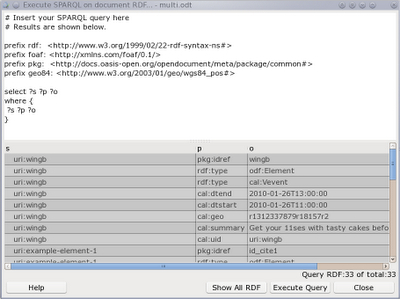
I've recently mentioned creating and jumping to the RDF Links (xml:id to RDF bridging) in Abiword. I also had a work in progress dialog to allow SPARQL Query execution. Things are moving along quite nicely and the RDF subsystem continues to get stronger with a Triple Editor and updates to the SPARQL dialog shown below and execution support.
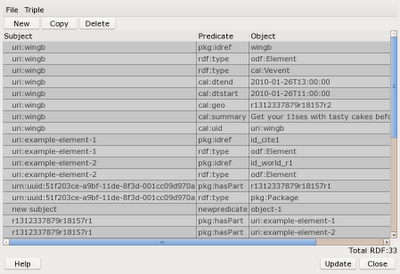
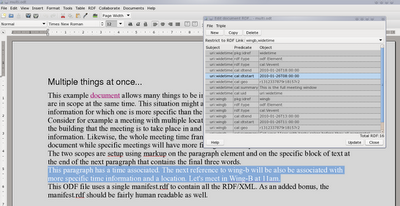
Shown below is the new RDF Editor dialog. The file menu allows you to import and export RDF/XML files into the document. The Triple menu has the same actions as the toolbar; new, copy, and delete. Shown at the bottom of the dialog is the total number of RDF triples for this document. Clicking on a cell in the table lets you edit it and you can use the existing URI prefixes if you like, for example rdf:type instead of the full URI. I have to allow configuration of those prefixes yet.
When you select some text in Abiword you can use Insert/RDF Link to create a new RDF link for that text. This is much like making a bookmark, hyperlink and other items.
The context menu for an RDF link allows you to edit the RDF associated with link. That window is shown below. There can be many RDF links in scope at any location in the document. Consider the case where a paragraph has RDF linked to it and a sentence and word does too. So when you bring up the RDF editor window from the context menu of an RDF link you get a combo box letting you select which links you want to see the RDF associated with.
By default the editor shows you all the RDF Links that are in scope where the cursor was located when you opened the dialog from the context menu. In this case widetime is an RDF link for the whole paragraph and wingb is for three words at the end of the paragraph. The dialog shows you the triples that link the subjects to this location: those with ?subject pkg:idref widetime. Selecting a different RDF link from the combo box restricts the triples shown to be only those associated with the RDF link you have chosen.
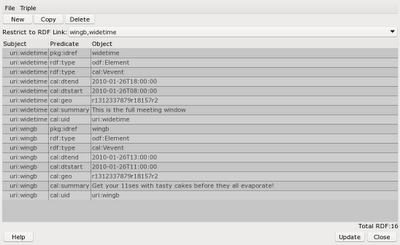
I decided to make the dialog automatically link any new triples you create or edit to the RDF link you have specified in the combo box. If there is more than one RDF link shown then the first link is used for new and updated triples.
This allows you to select some text, create an RDF link, right click the link and "Show RDF" from the context menu and start adding and editing triples and Abiword will automatically associate all those shown with the RDF link you have selected. Yay, full, low level RDF support with a GUI ;)
In case you have forgotten the scope of an RDF link in the document, the RDF editor will select the scope in the main document when you select a triple in the editor. I might make that functionality have a toggle button in the toolbar instead of making it happen automatically all the time.
One of the plugins that comes with Abiword is the "AbiCommand" which gives you a console interface to Abiword. You can start it from the shell using:
$ abiword --plugin AbiCommand
...
AbiWord command line plugin: Type "quit" to exit
AbiWord:>
I have added some new RDF commands to the AbiCommand plugin which allows fairly good interaction with RDF from the command line. The context-model commands allow you to set and interact with a submodel of all the RDF in the document. For example, only the RDF that is associated with a given xml:id. All updates to RDF happen via a mutation object. So you first use rdf-mutation-create, then add/remove as desired and complete things with rdf-mutation-commit. For those who are still reading now, see pd_DocumentRDF.h in the C++ source code and you'll notice createMutation() in the model, with add(), remove(), commit() and rollback() methods. The new commands in AbiCommand are shown below:
Some examples of AbiCommand interaction are shown below to give a little idea of use. These are using the multi.odt from my plugtest github repository.
Shown below is the new RDF Editor dialog. The file menu allows you to import and export RDF/XML files into the document. The Triple menu has the same actions as the toolbar; new, copy, and delete. Shown at the bottom of the dialog is the total number of RDF triples for this document. Clicking on a cell in the table lets you edit it and you can use the existing URI prefixes if you like, for example rdf:type instead of the full URI. I have to allow configuration of those prefixes yet.
When you select some text in Abiword you can use Insert/RDF Link to create a new RDF link for that text. This is much like making a bookmark, hyperlink and other items.
The context menu for an RDF link allows you to edit the RDF associated with link. That window is shown below. There can be many RDF links in scope at any location in the document. Consider the case where a paragraph has RDF linked to it and a sentence and word does too. So when you bring up the RDF editor window from the context menu of an RDF link you get a combo box letting you select which links you want to see the RDF associated with.
By default the editor shows you all the RDF Links that are in scope where the cursor was located when you opened the dialog from the context menu. In this case widetime is an RDF link for the whole paragraph and wingb is for three words at the end of the paragraph. The dialog shows you the triples that link the subjects to this location: those with ?subject pkg:idref widetime. Selecting a different RDF link from the combo box restricts the triples shown to be only those associated with the RDF link you have chosen.
I decided to make the dialog automatically link any new triples you create or edit to the RDF link you have specified in the combo box. If there is more than one RDF link shown then the first link is used for new and updated triples.
This allows you to select some text, create an RDF link, right click the link and "Show RDF" from the context menu and start adding and editing triples and Abiword will automatically associate all those shown with the RDF link you have selected. Yay, full, low level RDF support with a GUI ;)
In case you have forgotten the scope of an RDF link in the document, the RDF editor will select the scope in the main document when you select a triple in the editor. I might make that functionality have a toggle button in the toolbar instead of making it happen automatically all the time.
One of the plugins that comes with Abiword is the "AbiCommand" which gives you a console interface to Abiword. You can start it from the shell using:
$ abiword --plugin AbiCommand
...
AbiWord command line plugin: Type "quit" to exit
AbiWord:>
I have added some new RDF commands to the AbiCommand plugin which allows fairly good interaction with RDF from the command line. The context-model commands allow you to set and interact with a submodel of all the RDF in the document. For example, only the RDF that is associated with a given xml:id. All updates to RDF happen via a mutation object. So you first use rdf-mutation-create, then add/remove as desired and complete things with rdf-mutation-commit. For those who are still reading now, see pd_DocumentRDF.h in the C++ source code and you'll notice createMutation() in the model, with add(), remove(), commit() and rollback() methods. The new commands in AbiCommand are shown below:
...RDF subsystem...
Where a function reads RDF, it will try to use the RDF context model if it is set
Otherwise the entire RDF for the document is used.
An RDF context is obtained using rdf-set-context*
and cleared with rdf-clear-context-model
rdf-import <src> - load all RDF from an RDF/XML file at <src> into the document
rdf-export <dst> - save all document RDF to an RDF/XML file at <dst>
rdf-clear-context-model - RDF can at times use a context model which is a subset of
all the RDF associated with the document.
This command clears that and uses all the RDF again.
rdf-set-context-model-pos <pos> - Use a context model with the subset of RDF
associated with the given document position
rdf-set-context-model-xmlid <xmlid> [readxmlid1,readxmlid2]
- Use a context model with the subset of RDF
associated with the given document xml:id value
rdf-context-show-objects <s> <p> - Show the object list for the given subject,predicate pair
rdf-context-show-subjects <p> <o> - Show the subject list for the given predicate,object pair
rdf-context-contains <s> <p> <o> - True if the triple is there.
rdf-context-show-arcs-out <s> - Show the predicate objects associated
with the given subject
rdf-get-xmlids - Get a comma separated list of the xml:ids assocaited
with the current cursor location
rdf-get-all-xmlids - Get a comma separated list of all the xml:ids
rdf-get-xmlid-range <xmlid> - Show the start and end document position associated
with the given <xmlid>
rdf-movept-xmlid-start <xmlid> - Move the cursor location to the start of the range
for the given xml:id value
rdf-movept-xmlid-end <xmlid> - Move the cursor location to the end of the range
for the given xml:id value
rdf-uri-to-prefixed <uri> - Convert full uri to prefix:rest
rdf-prefixed-to-uri <uri> - Convert prefix:rest to full uri
rdf-size - Number of RDF triples for context
rdf-mutation-create - Start a RDF mutation for the document
rdf-mutation-add <s> <p> <o>- Add the given triple to the current mutation
rdf-mutation-remove <s> <p> <o>- Remove the given triple in the current mutation
rdf-mutation-commit - Commit current RDF mutation to the document
rdf-mutation-rollback - Throw away changes in current RDF mutation
rdf-execute-sparql - Execute SPARQL query against RDF context
rdf-xmlid-insert <xmlid> - Insert xml:id for current selection
rdf-xmlid-delete <xmlid> - Delete the xml:id from the document
Some examples of AbiCommand interaction are shown below to give a little idea of use. These are using the multi.odt from my plugtest github repository.
load /tmp/multi.odt
rdf-export /tmp/output.rdf
rdf-import /tmp/extra.rdf
rdf-set-context-model-pos 1006
rdf-export /tmp/1006.rdf
rdf-set-context-model-xmlid wingb
rdf-export /tmp/wingb.rdf
rdf-clear-context-model
rdf-export /tmp/all.rdf
rdf-get-xmlid-range wingb
rdf-execute-sparql "prefix rdf: <http://www.w3.org/1999/02/22-rdf-syntax-ns#>
prefix foaf: <http://xmlns.com/foaf/0.1/>
prefix pkg: <http://docs.oasis-open.org/opendocument/meta/package/common#>
prefix geo84: <http://www.w3.org/2003/01/geo/wgs84_pos#>
select ?s ?p ?o ?rdflink
where {
?s ?p ?o .
?s pkg:idref ?rdflink .
filter( str(?rdflink) = \"wingb\" || str(?rdflink) = \"widetime\" )
}"
load /tmp/multi.odt
movept +27
selectstart
movept +4
rdf-xmlid-insert foo
save /tmp/updated.odt
load /tmp/multi.odt
rdf-context-contains uri:wingb rdf:type http://www.w3.org/2002/12/cal/icaltzd#Vevent
rdf-context-show-objects uri:wingb rdf:type
rdf-context-show-subjects rdf:type http://www.w3.org/2002/12/cal/icaltzd#Vevent
rdf-context-show-arcs-out uri:wingb
Tuesday, August 2, 2011
RDF Linking in Abiword
Another minor step forward in the quest to make the RDF facility in ODF more useful to document authors... Abiword can now create links to RDF and you can jump to these links in a similar manner to how bookmarks work. The upside to using RDF links over bookmarks is that you can associate meaning with the RDF links. So for example, the text "Barry" can be associated with his vcard and possibly normal work geolocation.
Making a new RDF link is just like inserting a bookmark:
And the "Go To..." dialog now offers RDF links as first class citizens. I did a little tweaking to this goto window while I was at it; moving things into a paged configuration and abstracting out some common code into utility functions.
On the API front, there are now STL like iterators for the RDF and that theme will be present in the query results engine and perhaps also in the arcsOut() API. Speaking of querying, the window for SPARQL is coming along. I'll start working on the actual query execution shortly. Notice that the RDF triples are shown with namespaces in effect so you get something more readable.
As I mentioned in my previous post, the purple links can be turned on and off to highlight parts of the document with RDF associated. Using a special menu item you can pull up the SPARQL query dialog with a preformed query to show just the RDF associated with the current cursor location.
I admit that some of this is quite low level, for example directly inspecting the triples for the cursor position. But full disclosure isn't a bad thing right? I syndicated this to planet KDE because Calligra handles RDF too. Hopefully posts about RDF are interesting to hackers regardless of the desktop platform :)
Making a new RDF link is just like inserting a bookmark:
And the "Go To..." dialog now offers RDF links as first class citizens. I did a little tweaking to this goto window while I was at it; moving things into a paged configuration and abstracting out some common code into utility functions.
On the API front, there are now STL like iterators for the RDF and that theme will be present in the query results engine and perhaps also in the arcsOut() API. Speaking of querying, the window for SPARQL is coming along. I'll start working on the actual query execution shortly. Notice that the RDF triples are shown with namespaces in effect so you get something more readable.
As I mentioned in my previous post, the purple links can be turned on and off to highlight parts of the document with RDF associated. Using a special menu item you can pull up the SPARQL query dialog with a preformed query to show just the RDF associated with the current cursor location.I admit that some of this is quite low level, for example directly inspecting the triples for the cursor position. But full disclosure isn't a bad thing right? I syndicated this to planet KDE because Calligra handles RDF too. Hopefully posts about RDF are interesting to hackers regardless of the desktop platform :)
Tuesday, July 19, 2011
Abiword & RDF Gusto
I recently blogged about updating Calligra to improve its RDF support and bring back support for viewing and editing location information using Marble. A computer loves RDF because it is nice and verbose and allows low level unambiguous expression of semantics in a format that a machine can work with. For a human however, some might find having long descriptors, schemas and the like just to say "meet me at the Mall" a little tedious. One of the many challenges that I see for office applications wanting to offer RDF to the user is making it visible in a subtle way.
Abiword can now colour code parts of the document which have RDF associated with them and tell you how that association is formed, and how much RDF is linked at any point. In the below, the purple text has some RDF associated, and the purple "Mark" I have the mouse pointer on so it shows the bubble text letting you know how the RDF is attached and how much of it there is.
In the future I of course want to let you know more; is the RDF location, contact, event, or related to another domain. It would also be nice to highlight RDF only for types. So, for example if you are interested only in the times that trains leave then highlight departure logistics in bold red. The computer knows what you mean too, so might also want to offer a menu button to check if the train is on time or not.
Being able to highlight like this is a good start because it allows users who are unfamiliar with the document the chance to know exactly where there might be RDF "hiding".
Abiword can now colour code parts of the document which have RDF associated with them and tell you how that association is formed, and how much RDF is linked at any point. In the below, the purple text has some RDF associated, and the purple "Mark" I have the mouse pointer on so it shows the bubble text letting you know how the RDF is attached and how much of it there is.
In the future I of course want to let you know more; is the RDF location, contact, event, or related to another domain. It would also be nice to highlight RDF only for types. So, for example if you are interested only in the times that trains leave then highlight departure logistics in bold red. The computer knows what you mean too, so might also want to offer a menu button to check if the train is on time or not.Being able to highlight like this is a good start because it allows users who are unfamiliar with the document the chance to know exactly where there might be RDF "hiding".
Saturday, April 16, 2011
ODF and Generic Change Tracking: part II, styles.
So now abiword can save and load ODF files with improved generic tracked changes to styles. These style changes might be nested, and the window that a style is applied to might shift over revisions. The below video demonstrates the scenario in example 6.4.2 of the generic track changes proposal that is being considered by the Advanced Document Collaboration OASIS ODF Technical subcommittee.
The actual serialization to ODF is along the lines of my proposed output but also using the ac:change stack to avoid unnecessary nesting as has been mentioned that OpenOffice might produce and consume if the generic proposal were to be chosen by the oasis subcommittee.
ODT Change Tracking part 2: Example 6.4.2 from Ben Martin on Vimeo.
Labels:
abiword,
calligra,
generic change tracking,
oasis,
ODF
Friday, April 1, 2011
Abiword with ODT and Generic Track Changes
I've been hacking support for the proposed generic track changes for ODF into abiword recently. This means that you can generate and store documents with many revisions and see who added/deleted and modified what in which revision over time. Kind of handy for sending your professor the latest design for your perpetual motion machine and being able to see where they think your design might be too optimistic ;)
Anyway, both the branch of abiword and a test suite are up on github to allow anyone to grab it, prod it in the guts, and see how things might operate. Be aware that this is a work in progress right now, and I might commit stuff which is still a work in progress.
The code is at
https://github.com/monkeyiq/odf-2011-track-changes-git-svn
The test suite is at
https://github.com/monkeyiq/odf-2011-track-changes-tests
The following instructions will build abiword from the change tracking code on github. The build will install into /tmp and will not interfere with an abiword which is installed from your Linux distribution's package system. Both abiword builds will be available to you.
$ mkdir tmp
$ cd ./tmp
$ git clone https://github.com/monkeyiq/odf-2011-track-changes-git-svn
$ cd ./odf-2011-track-changes-git-svn
$ ./autogen.sh
$ ./configure --enable-debug \
--enable-collab-backend-service \
--enable-clipart \
--enable-templates \
--prefix=/tmp/abiword-install-odfct \
--enable-plugins="collab"
$ time nice make -j5
$ make install
$ /tmp/abiword-install-odfct/bin/abiword
The download can be done in reasonable time over ADSL, on an Intel Q6600 the make took about 4 minutes. You might like to adjust the -j on the make line to suit your core count. Notice that since everything is installed into /tmp you don't have to run the install as root either. You will get debugging output in the console when using abiword built this way, but that's what you want when running dev code right?
Starting to use change tracking is really easy now too. Though I need to convince somebody who can create clipart to make new icons for revision handling, so the arrow in the below points to the main toolbar icon you want to know about. The icon directly to the right of it will let you select a revision to see from a list.

At first, the additional icons to the right of will not be visible to you as they are only useful when you are using track changes. Each time you click the icon with the arrow pointed at it, abiword will ask to to name a new revision. This makes it nice and simple to create a 5-10 revision test document to play with ODT and Change tracking. Note that abiword can save the change tracking information in it's native abw format as well as ODT. In fact, that is what the core of the test suite linked above does; convert between these formats and make sure that nothing is lost in translations. This way you get to know that abiword can write *and* read back its ODT files without loosing precious information.
Anyway, both the branch of abiword and a test suite are up on github to allow anyone to grab it, prod it in the guts, and see how things might operate. Be aware that this is a work in progress right now, and I might commit stuff which is still a work in progress.
The code is at
https://github.com/monkeyiq/odf-2011-track-changes-git-svn
The test suite is at
https://github.com/monkeyiq/odf-2011-track-changes-tests
The following instructions will build abiword from the change tracking code on github. The build will install into /tmp and will not interfere with an abiword which is installed from your Linux distribution's package system. Both abiword builds will be available to you.
$ mkdir tmp
$ cd ./tmp
$ git clone https://github.com/monkeyiq/odf-2011-track-changes-git-svn
$ cd ./odf-2011-track-changes-git-svn
$ ./autogen.sh
$ ./configure --enable-debug \
--enable-collab-backend-service \
--enable-clipart \
--enable-templates \
--prefix=/tmp/abiword-install-odfct \
--enable-plugins="collab"
$ time nice make -j5
$ make install
$ /tmp/abiword-install-odfct/bin/abiword
The download can be done in reasonable time over ADSL, on an Intel Q6600 the make took about 4 minutes. You might like to adjust the -j on the make line to suit your core count. Notice that since everything is installed into /tmp you don't have to run the install as root either. You will get debugging output in the console when using abiword built this way, but that's what you want when running dev code right?
Starting to use change tracking is really easy now too. Though I need to convince somebody who can create clipart to make new icons for revision handling, so the arrow in the below points to the main toolbar icon you want to know about. The icon directly to the right of it will let you select a revision to see from a list.

At first, the additional icons to the right of will not be visible to you as they are only useful when you are using track changes. Each time you click the icon with the arrow pointed at it, abiword will ask to to name a new revision. This makes it nice and simple to create a 5-10 revision test document to play with ODT and Change tracking. Note that abiword can save the change tracking information in it's native abw format as well as ODT. In fact, that is what the core of the test suite linked above does; convert between these formats and make sure that nothing is lost in translations. This way you get to know that abiword can write *and* read back its ODT files without loosing precious information.
Labels:
abiword,
Change Tracking,
document computing,
ODF,
ODT
Subscribe to:
Posts (Atom)